
Voxys Connect lets you create interactive message types like cards and forms inside your Voxys Connect Web Widget using the APIs.
You can create these messages using the New Message API.
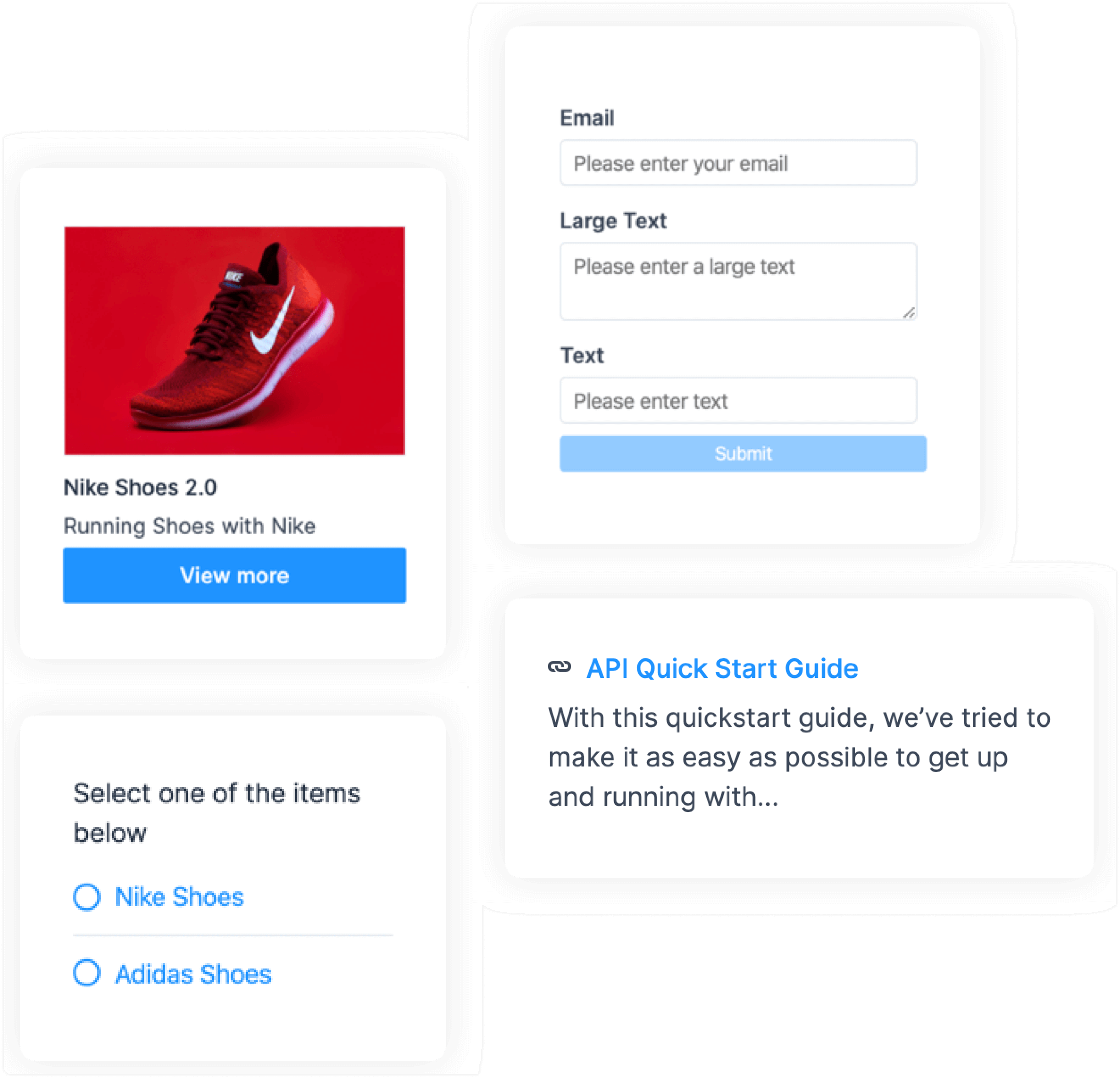
Payload Samples
Use the following payload samples as the values to create various interactive messages.
1. Options
{
    "content": "Select one of the items below",
    "content_type": "input_select",
    "content_attributes": {
        "items": [
            { "title": "Option1", "value": "Option 1" },
            { "title": "Option2", "value": "Option 2" }
        ]
    },
    "private":false
}
2. Form
{
  "content": "form",
  "content_type": "form",
  "content_attributes": {
    "items": [
      {
        "name": "email",
        "placeholder": "Please enter your email",
        "type": "email",
        "label": "Email",
        "default": "[email protected]"
      },
      {
        "name": "text_aread",
        "placeholder": "Please enter text",
        "type": "text_area",
        "label": "Large Text",
        "default": "Sample text"
      },
      {
        "name": "text",
        "placeholder": "Please enter text",
        "type": "text",
        "label": "text",
        "default": "sample input"
      },
      {
        "name": "select",
        "label": "Select Option",
        "type": "select",
        "options": [
          {
            "label": "🌯 Burito",
            "value": "Burito"
          },
          {
            "label": "🍝 Pasta",
            "value": "Pasta"
          }
        ]
      }
    ]
  },
  "private": false
}
3. Cards
{
   "content": "card message",
   "content_type":"cards",
   "content_attributes":{
      "items":[
         {
            "media_url":"https://assets.ajio.com/medias/sys_master/root/hdb/h9a/13582024212510/-1117Wx1400H-460345219-white-MODEL.jpg",
            "title":"Nike Shoes 2.0",
            "description":"Running with Nike Shoe 2.0",
            "actions":[
               {
                  "type":"link",
                  "text":"View More",
                  "uri":"google.com"
               },
               {
                  "type":"postback",
                  "text":"Add to cart",
                  "payload":"ITEM_SELECTED"
               }
            ]
         }
      ]
   },
   "private":false
}
4. Articles
{
    "content": "articles",
    "content_type": "article",
    "content_attributes": {
        "items": [
            { "title": "API start guide", "description": "A random start api guide", "link": "http://google.com" },
            { "title": "Development docs", "description": "Development docs and guidelines", "link": "http://google.com" }
        ]
    },
    "private":false
}